Scheduling EV Charge Time
To schedule EV-charging directly from your app:
- Click ‘Schedule’ under the EV charger menu and select preferred start and end times, as seen below.
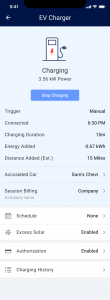

- Schedule charging for specific times throughout the day. Your EV charger will use solar power by default, complemented by grid power as a secondary source.
- You can create up to four separate schedules for each EV charger, including dates and start/finish times. Scheduled charging is recommended for additional savings in areas with time-of-use rates to limit grid charging to off-peak electricity hours when rates are lower. It is also recommended to schedule charging times if your EV charger needs exceed your home’s energy consumption during the day. Tip: check your local energy-usage tariffs to determine preferred charge times.
- If you install a SolarEdge smart EV charger in tandem with a SolarEdge PV system and it is directly connected to a consumption meter, you can take advantage of the excess solar mode to charge your EV with up to 100% solar power.
- To activate, simply click ‘Solar Charging’ under the EV Charger menu. Tap the ‘activate’ button to charge from excess solar power whenever it is available. This will trigger excess solar charging when the amount of surplus solar in your home exceeds the minimal charge power required by your EV (1.5 kW).
Configuring EV Charger via mySolarEdge
Please accept cookies to access this content
Enable Solar Charging
Please accept cookies to access this content
View and Track Charging History
Please accept cookies to access this content
EV Charger Scheduling
Please accept cookies to access this content
Was this article helpful?
That’s Great!
Thank you for your feedback
Sorry! We couldn't be helpful
Thank you for your feedback
Feedback sent
We appreciate your effort and will try to fix the article